Delete Your Account
You can request deletion of your Yaya account and all associated personal data directly from within the app, or by reaching out to our support team.
Method 1 — In-AppDelete from the Yaya app
RecommendedThe fastest way to delete your account. Available directly within the app at any time.
- 1
Open the app and go to Settings
Tap your profile icon in the bottom navigation bar
- 2
Tap Security
Under the Your Account section
- 3
Tap "Delete Account"
Scroll to the bottom of the Security screen and confirm deletion
Settings›Security›Delete Account
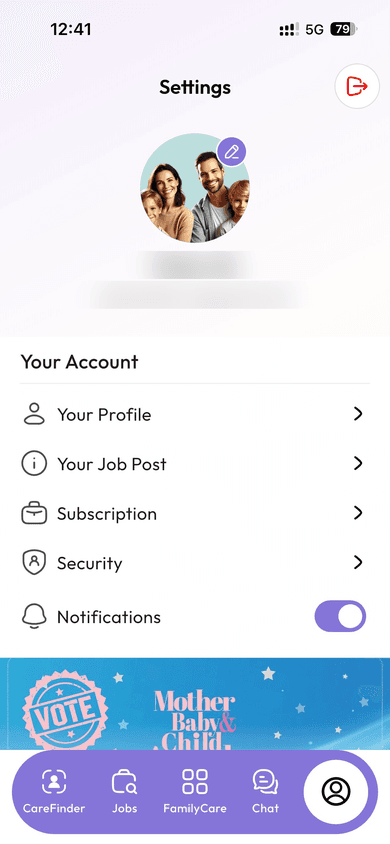 Settings screen
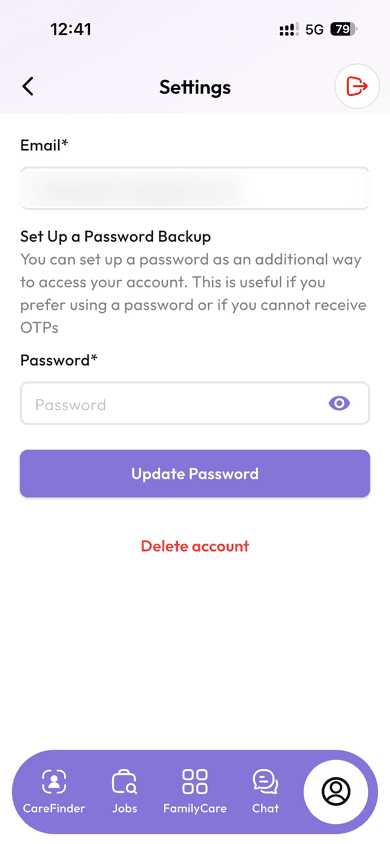 Security screen
Account deletion is permanent and cannot be undone. All your data, messages, and subscription history will be permanently removed.
or
Method 2 — Contact SupportGet help from our team
If you no longer have access to your account or need assistance, our support team can process your deletion request within 30 days.